Home: Products: Barcode Fonts: Code-39 Symbology Bar Code Fonts:

IDAutomation Code 39 Barcode Font PackageCode-39 Barcode Font Advantage Package

  • Easily print barcodes as a font from several applications.
  • Includes examples for Microsoft® Word, Excel, Access and Crystal Reports.
  • Compatible with Microsoft Windows®, Macintosh, Unix, Linux and others.
  • Over 30 font tools, macros & plug-ins are provided for easy integration.
  • Contains Patent Pending font technology to produce high quality barcodes.
  • Includes TrueType, OpenType, PostScript and PCL laserjet soft fonts.
  • Contains 24 different Code 3 of 9 font versions in six (6) font formats with normal and human-readable versions.
  • Supports AIM USS Code 39, ANSI, EN800 and other specifications based on Barcode 3/9 including LOGMARS, LIC and HIBC.

Implementing barcode solutions with IDAutomation's fonts provides a high level of scalability with operating system, application and printer independence. Learn more about the quality of IDAutomation's fonts.

Code 39 Fonts - Order Online and Download Now  Specifications | Symbology FAQ | Extended Code 39 | Support | Download Demo | Installation
 

 Code 39 Font Advantage Package Features

This package contains 24 different Code 39 fonts in six different font formats. The license to the package also provides the rights to use the font tools, macros and source code to help integrate the fonts into various applications. Features and details are as follows:

  • Ease-of-use - IDAutomation's Code 39 Fonts may be created directly from the keyboard or used in a calculated field to dynamically produce multiple symbols. For example, to create a barcode manually that encodes the data "BARCODE39", perform the following:
        1. Select the barcode font from the list of fonts;
        2. Type the start character of "*";
    "The Code 39 Font provided by IDAutomation.com enabled us to ship resources quicker, with less errors and less human intervention. The process is largely due to the 'scanable' Packing Slip ID merged to a MS Word document with the Code 39 Font for the ID Bar Code. Other processes we considered required programming solutions prior to printing packing slips in order to achieve the checksum value required. Using the IDAutomation.com Code 39 Font, no programming was required apart from setting up the MS Word Template with the required MS Excel spreadsheet." - Al Ebel, IS Manager, Focus on the Family
        3. Enter the data to be encoded, which is "BARCODE39";
        4. And type the stop character of "*"
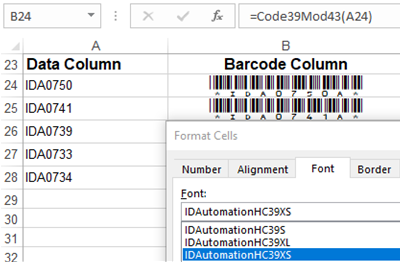
  • Several Font Tools Included - If a checksum is needed for Code 39 (such as for HIBC, LIC and LOGMARS), IDAutomation provides the Code39Mod43() function in all font tools for this purpose. IDAutomation also provides a Code39() function that converts spaces to the "=" character and automatically adds the start and stop characters to the barcode font. Available font tools include the following:
  • Microsoft® Office Compatibility - The exclamation (!) and asterisk (*) characters in the Code39 barcode font are used as start and stop characters and therefore should not be part of the data in the bar code. The asterisk "*" is commonly used as the start / stop character with Code 39, however, this can cause problems because some applications, such as Microsoft Word, will treat any text surrounded with asterisks as bold text.
  • Space Character Support - When the Code39 barcode font is selected, the space character will not produce a barcode but a space. To print the barcode symbol representing a space, it will be necessary to type or print "=" (the equal character) instead of a space character or use the Font Automation Tools to perform automatic conversion.
  • Industry Standard Support - The Code 39 fonts were developed according to AIM, ANSI and European EN 800 standards.
  • Flexibility - The parentheses () may also be used instead of “!” or “*” as the start and stop code to eliminate the “*” from appearing in the human readable version of the fonts.
  • Advanced Font Design - These fonts have been specially designed to produce dependable barcodes of all sizes. The IDAutomation SC5 USB Scanner easily and dependably scans this bar-code font when printed as small as 6 points. In addition, the IDAutomation Plug 'n Play USB Wand scans this bar-code font when printed as small as 8 points and reads very wide barcodes.
  • Extended Character Support - It is possible to print extended characters from Code 39 to encode tabs, returns or lower case letters. For more information about this, view the extended code-39 page. If it is necessary to encode several extended characters (extended characters are digits other than numbers, uppercase letters, the space, minus, period, dollar sign, slash, plus and percent symbols), consider using IDAutomation's Code 128 fonts. Encoding several extended characters with Code 39 is not very efficient.
  • Low Resolution Printer Support - IDAutomation's Code39 Fonts are designed to print precisely on 203 DPI thermal printers and 300 DPI printers in addition to higher resolution printers.
  • Calculated Field Use - Barcodes may be dynamically created from a calculated field in a text box by using a formula that appends the start and stop characters and selecting the barcode font for the text box. This is possible in several applications including the following:
    • Active Reports - Field1.Text ="*"&Field&"*" example...
    • “For the first time, I was able to download a package that provided me with all the requirements for my project, contained in one package. This font package enables us to efficiently track the high throughput of our vaccine production.” - Burke Squires, Eliance Biotechnology, Dallas, Texas

    • Clarion - loc:barcode='*'&left(clip(DataField))&'*'
    • Crystal Reports - Enter "*" & Field & "*" in a calculated field.
    • FileMaker Pro - Enter "*" & Field & "*" in a calculated field so that the asterisk is appended to the beginning and ending of the data from the source field.
    • Lotus Notes - A formula that places a return function (in extended39) between fields: "*" + DataField1 + "$M" + DataField2 + "*"
    • Lotus Approach - Combine('*', DataField, '*') - Here is an approach formula that also replaces spaces with the "=" character as required: Combine('*', Translate(DataField,' ','='), '*')
    • Lotus 123 for Windows® - Enter in another cell, text data from cell C3: ("*"&C3&"*") - this formula converts a number in cell C9 to text for barcoding: ("*"&@STRING(C9,0)&"*")
    • Microsoft® Access - =("!"&[Table.Field1]&"!") - This formula places a tab (in extended39) between fields: =("!"&[Table.Field1] & "$I" & [Table.Field2] & "!")
    • Microsoft® Excel - Enter in another cell, text data from cell C3: =("!"&C3&"!")
    • Oracle Reports and Forms - Place an asterisk before and after the data and apply IDAutomation's barcode font to the field.
    • QuickBooks - Refer to IDAutomation's QuickBooks Barcode Tutorial.
  • Multiple Formats Provided - When a license for the font is purchased, all versions specified below are provided:
    • TrueType fonts in PC and Macintosh format. The TrueType TTF fonts are compatible with Macintosh OS X and all versions of Microsoft Windows, including Pocket PC. Macintosh formatted MTT TrueType fonts are compatible with Macintosh System 7.1 and above.
    • OpenType OTF fonts with PostScript outlines. These are compatible with Windows®, Macintosh OS X and other systems supporting the OpenType format.
    • PostScript Type 1 fonts in binary, ASCII and Macintosh versions.
    • PCL laserjet soft fonts in 8, 12, 16, 20 and 24 points.
    • With the purchase of a Developer License, the fonts may be converted to other formats as necessary including TrueDoc and OpenType.
    • Installation assistance is provided in the documentation and at the font installation procedures site.

 Code 39 Symbology Information

LOGMARS and HIBC barcodes created from the Code 39 font.Code 39 (also called Code 3 of 9) is an easy-to-print barcode commonly used for various bar-coding labels such as name badges, inventory and industrial applications. The symbology of the Code 3/9 character set consists of bar code symbols representing uppercase letters, numbers, the space character and the following symbols: - .  $  /  +  %. The Code 39 barcode is the easiest to use of alpha-numeric barcodes and is designed for character self-checking, eliminating the requirement for check character calculations. Code 39 is used for several standards including:

  • LOGMARS (Logistics Applications of Automated Marking and Reading Symbols) is an application of Code 39 used by the United States Department of Defense that recommends a check character. LOGMARS is defined by Military Standard MIL-STD-1189B and others such as MIL-STD-129, MIL-STD-129N and MIL-STD-2073-1C. The variety of fonts provided with the Code39 font package and IDAutomation's Code39Mod43() function in IDAutomation's font tools allows for implementation of this standard.
  • HIBC (Health Industry Barcode) is a Code 39 barcode format that all health care products should be labeled with. IDAutomation's 3 to 1 bar ratio in the Code 39 fonts and IDAutomation's Code39Mod43() function in the font automation tools allow for implementation of this standard also. Please refer to the HIBC site for details on formatting this barcode.

For more information about Code 39, please refer to the Code 39 FAQ.

 To Order the Code 39 Font Advantage Package License

All orders include free, automatic registration for technical support and product upgrades for a period of 30 days. Support and upgrades may be provided beyond 30 days if the Priority Support and Upgrade Subscription is purchased when making the order.

IDAutomation.com offers secure, encrypted online ordering by credit card and immediate delivery via download after the order is approved. Other ordering options.

License Summary: (Choose the appropriate link to obtain more details about the license type.)

  • The Developer License allows one (1) developer royalty-free distribution up to 10,000 user licenses.
  • The 5 Developer License grants the rights of the Developer License for up to five (5) developers and 20,000 user licenses.
  • The Unlimited Developer License grants the rights of the Developer License for an unlimited number of developers and an unlimited number of user licenses.
  • The Small Company Developer License grants the rights of the Developer License to qualifying organizations.
  • The Single User License allows use of the Software for one (1) user in your organization. However, if the Software is used in connection with a high speed printer that prints over 55 pages per minute or a system (including all hardware, printer and software) having a cost totaling over 50,000 USD or equivalent in a foreign currency, a Developer License is required. Highly discounted Multiple User Licenses are also available in various quantities.
Product Types Single User License Small Company Developer License Developer License 5 Developer License Unlimited Developer License
Code 39 Font Package
TrueType, OpenType, PCL laserjet soft fonts and PostScript font versions are included
Online Order Form  Download Demo
$139 $417 $790 $1580 $2370

If assistance is needed, please contact IDAutomation.

 Code 39 Font Specifications and Font Name Descriptions

To sign up for monthly updates about new products or upgrades, please click here.The X dimension (width of the narrow bar) is listed below for various point sizes. The N Dimension (narrow to wide ratio) is 3:1 which is recommended by international standards. If an N dimension of 2 or 2.5 is desired, IDAutomation also offers the Universal Barcode Font Advantage™, which offers additional N Dimensions of 2:1 and 2.5:1 and is designed to create multiple barcode types as a single font.

IDAutomation’s advanced Code 39 fonts have been designed to print dependably at six points or greater, provided that the scanner can read the symbol. IDAutomation has been able to dependably scan this font with the IDAutomation USB Barcode Scanner when printed at six points on a 600 DPI laser printer.

Point Size

Approximate X dimension (1 mil = .001")

48 .102 cm 40 mil
36 .076 cm 30 mil
32 .069 cm 27 mil
30 .064 cm 25 mil
28 .058 cm 23 mil
24 .051 cm 20 mil
20 .043 cm 17 mil
18 .038 cm 15 mil
16 .033 cm 13 mil
12 .025 cm 10 mil
8 .018 cm 7 mil
6 .013 cm 5 mil

* To print at a different X dimension, find the point size that has the X dimension closest to what is needed and use the formula below to find the point size needed:
12 * (X dimension needed) / (X dimension at 12 points) = (point size)
For example, to obtain an X dimension of 12 mils, the point size should be 14:
12 * 12 / 10 = 14

NOTICE: When using a printer with less than 600 DPI, the following point sizes should be used to create accurate barcodes:

 203 DPI Printer (thermal printer)  300 DPI Printer
 6, 12, 18, 24, 30, 36...  4, 8, 12, 16, 20, 24, 28, 32, 36...

Several versions of the Code 39 barcode fonts are provided for various implementations. The last character in the Code-39 barcode font name determines the height of the barcode, with the shortest being "XS" and the tallest being "XXL". Because each single font may be printed at various point sizes, there are several combinations of heights that can be produced. IDAutomation recommends the IDAutomationC39M font if it is difficult to determine which to use.

Font name of purchased version Font name of eval version* Font height at 12 points*
Code 3 of 9 Fonts with text below the barcode:
IDAutomationHC39XS IDAutomationSHC39XS  .20" or .5 CM
IDAutomationHC39S IDAutomationSHC39S  .35" or .9 CM
IDAutomationHC39M IDAutomationSHC39M  .50" or 1.2 CM
IDAutomationHC39L IDAutomationSHC39L  .70" or 1.8 CM
IDAutomationHC39XL IDAutomationSHC39XL  .90" or 2.3 CM
IDAutomationHC39XXL IDAutomationSHC39XXL  1.25" or 3.2 CM
Code 3 of 9 Fonts with no text below the barcode:
IDAutomationC39XS IDAutomationSC39XS  .20" or .5 CM
IDAutomationC39S IDAutomationSC39S  .35" or .9 CM
IDAutomationC39M IDAutomationSC39M  .50" or 1.2 CM
IDAutomationC39L IDAutomationSC39L  .70" or 1.8 CM
IDAutomationC39XL IDAutomationSC39XL  .90" or 2.3 CM
IDAutomationC39XXL IDAutomationSC39XXL  1.25" or 3.2 CM
Extended Code 3 of 9 Fonts with text below the barcode:
IDAutomationXHC39XS    .20" or .5 CM
IDAutomationXHC39S    .35" or .9 CM
IDAutomationXHC39M IDAutomationSXHC39M  .50" or 1.2 CM
IDAutomationXHC39L    .70" or 1.8 CM
IDAutomationXHC39XL    .90" or 2.3 CM
IDAutomationXHC39XXL    1.25" or 3.2 CM
Extended Code 3 of 9 Fonts with no text below the barcode:
IDAutomationXC39XS    .20" or .5 CM
IDAutomationXC39S    .35" or .9 CM
IDAutomationXC39M    .50" or 1.2 CM
IDAutomationXC39L    .70" or 1.8 CM
IDAutomationXC39XL    .90" or 2.3 CM
IDAutomationXC39XXL    1.25" or 3.2 CM
 
* Measurements are approximate and were measured when printed at 12 points, which should work for most scanners. Measurements for Human Readable fonts do not include the text below.

To print at a different height, find the font that has the height closest to what is needed and use the following formula to find the point size that is needed:
12 * (height wanted) / (height at 12 points) = (point size converted to nearest integer)
For example, if using IDAutomationHC39M and the barcode needs to be .75" tall, it should be printed at 17 points:
12 * .75 / .5 = 17

 Font Names Used Prior to July, 2003

The last character in the Code 39 barcode font name determines the height of the barcode with the shortest being "a" and the tallest being "f".

Font name of purchased version Font name of eval version* Font height at 12 points*
Code 3 of 9 Fonts with text below the barcode:
AdvHC39a SAdHC39a  1/8" (.125") or .3cm
AdvHC39b SAdHC39b  1/4" (.25") or .6cm
AdvHC39c SAdHC39c  13/32" (.4") or 1cm
AdvHC39d SAdHC39d  1/2" (.5") or 1.5cm
AdvHC39e SAdHC39e  7/8" (.88") or 2.2cm
AdvHC39f SAdHC39f  1 5/16" (1.31") or 3.4cm
Code 3 of 9 Fonts with no text below the barcode:
AdvC39a SAdvC39a  1/8" (.125") or .3cm
AdvC39b SAdvC39b  1/4" (.25") or .6cm
AdvC39c SAdvC39c  13/32" (.4") or 1cm
AdvC39d SAdvC39d  1/2" (.5") or 1.5cm
AdvC39e SAdvC39e  7/8" (.88") or 2.2cm
AdvC39f SAdvC39f  1 5/16" (1.31") or 3.4cm
Extended Code 3 of 9 Fonts with text below the barcode:
ExtHC39a    1/8" (.125") or .3cm
ExtHC39b    1/4" (.25") or .6cm
ExtHC39c SEXTH39C  13/32" (.4") or 1cm
ExtHC39d    1/2" (.5") or 1.5cm
ExtHC39e    7/8" (.88") or 2.2cm
ExtHC39f    1 5/16" (1.31") or 3.4cm
Extended Code 3 of 9 Fonts with no text below the barcode:
ExtC39a    1/8" (.125") or .3cm
ExtC39b    1/4" (.25") or .6cm
ExtC39c SEXTC39C  13/32" (.4") or 1cm
ExtC39d    1/2" (.5") or 1.5cm
ExtC39e    7/8" (.88") or 2.2cm
ExtC39f    1 5/16" (1.31") or 3.4cm


© Copyright 1998-2007 IDAutomation.com, Inc., All Rights Reserved. Legal Notices.

Over 70% of Fortune 100 companies use IDAutomation's products to automate their businesses.