MICR E13B Font Overview and Features
MICR E13B is a special font that is used on bank checks and drafts in the United States, Canada, Puerto Rico, Panama, the UK, and other countries to print E13B characters for magnetic recognition and optical
character recognition systems. This MICR font contains 10 specially designed numeric characters 0 through 9, and four special symbols: transit, amount, on-us, and dash.
User Manual
Troubleshoot
Check Design
Download Demo
Check Stock
MICR Toner
Industry Standard Support:
"IDAutomation's Check Design Software has more versatility than other software. It is very intuitive, and the possibilities are infinite. The logic in the program is organized and straight forward. This
is by far the easiest application to get up and running on the market. Couple that with the power of the program and it beats competition priced 5 or 10 times higher."
- Ted Sapperstein, Dee Michaels
Inc.
- ANSI and ISO Compliant:
- IDAutomation's MICR E13B fonts were created according to ISO 1004:1995 and meet the ANSI X9.27-1995 specification for MICR E13B characters.
- Because they were created from the ISO spec, the fonts meet the E13B specification for other countries as well. Examples include:
- Australian APCA Pub 3.3
- Canadian Payments Association Standard 006 Specification for MICR-Encoded Cheques.
- These fonts have been proven to pass the ABA banking standards in the USA for bank checks and paper-based drafts.
- IDAutomation MICR fonts have also been tested on several MICR readers and sorters, including the UNISYS DP500 and the IBM 3890.
- MICR Print Specifications: These specifications are a summary of the placement requirements obtained from the ABA (American Bankers Association).
Multiple Versions Provided:
The IDAutomationMICR font was created to precisely match each of the printer's pixels when printing at 300 dpi or multiples of 300 dpi above. This MICR font eliminates the need to calibrate
the font to the printer or to use different fonts on different printers unless the printer is out of alignment. For printers that are out of alignment, additional fonts are provided with a calibration
tool.
- 24 Additional Fonts: Additional MICR fonts are provided for printers that are out of alignment.
The following fonts are provided in the package; all font names begin with IDAutomationMICR.
| Intensity |
Narrow 2 |
Narrow 1 |
Standard Width |
Wide 1 |
Wide 2 |
| Extra Light |
N2XL |
N1XL |
XL |
W1XL |
W2XL |
| Light |
N2L |
N1L |
L |
W1L |
W2L |
| Normal |
N2 |
N1 |
IDAutomationMICR |
W1 |
W2 |
| Bold |
N2B |
N1B |
B |
W1B |
W2B |
| Extra Bold |
N2XB |
N1XB |
XB |
W1XB |
W2XB |
* Differences in intensities and widths may be noticed only on printers with 600 dpi or greater resolution.
** Fonts named MICR and E13B are the same as IDAutomationMICR and support
applications that require these specific names. |
- Security Fonts: Security fonts allow a safer method of printing names and currency amounts to reduce the risk of bank check forgery.
"This MICR E13B Font Advantage Package enabled us to create a check writing solution that is much cheaper than any off the shelf, and able to integrate with current systems"
- Eric Johnson, A.O.
Smith WPC, Ashland City, TN
|
Bank Check Design and Printing Software:
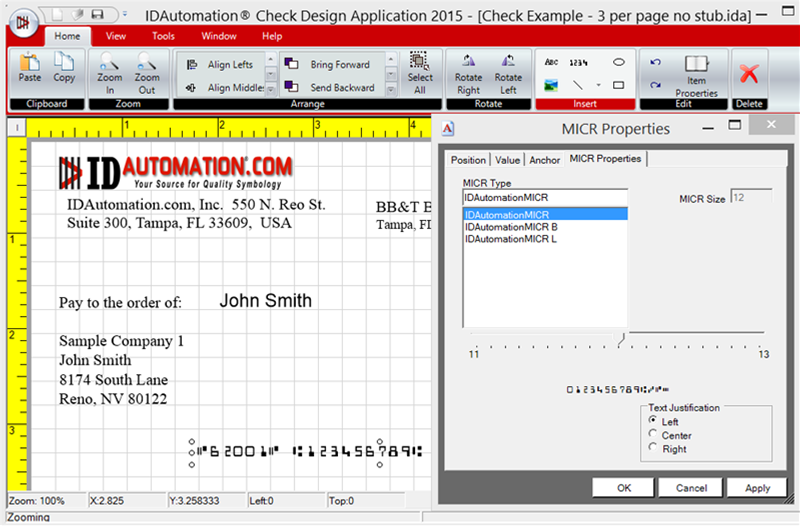
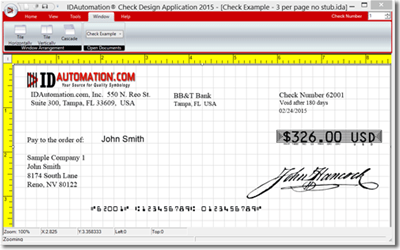
The 2015 version of the Bank Check Design and Printing Software adds .NET Framework native compatibility and includes performance enhancements to the printing, drawing, and viewing processes.
The software supports importing signature and logo images, and secure numeric amounts, and has many other powerful features such as VB scripting and database connectivity to CSV files, Excel, Access,
Oracle, and SQL Server.
- Accounting Software Compatibility: Some accounting packages, such as Peachtree 8 or greater, allow IDAutomation MICR fonts to be used on custom check forms. If an accounting application has
this capability, MICR fonts can save money on check printing by helping to streamline the process.
- Visual Basic Source: The Visual Basic source code included with the MICR Font package has been extracted from a working check printing application and should provide insight into automated
methods of printing bank checks with IDAutomation MICR E13B fonts.
Multiple Formats Provided:
When a license is purchased for this font package, the following typefaces are included:
- Digitally Signed: The latest version of this package includes embedded digital signatures within the TrueType and OpenType fonts.
- TrueType fonts are supplied as digitally signed, OpenType with TrueType TTF outlines. They are compatible with Mac OS X and all versions of Microsoft Windows, and mobile devices including iOS, Android,
and .NET Compact Framework.
- OpenType OTF fonts with digital signatures and PostScript outlines are provided. These are compatible with Windows, Linux, Mac OS X, and other systems supporting the OpenType format.
- PostScript Type 1 fonts are supplied as PFB and PFA files, including Mac-specific versions.
- PCL LaserJet soft fonts at 300 and 600 DPI.
Included with the purchase of a Developer License:
- With a purchase of the Developer License or above, a full set of Web Fonts is included in WOFF, EOT, and SVG formats to easily
display the fonts in any web browser.
- IDAutomation MICR fonts enable embedding in special PDF document applications such as Adobe Writer, Distiller, PDF Lib, and FOP TTF Reader with the purchase of a Developer License and above. This
level of embedding also supports the creation of OpenType and TrueDoc fonts for web pages.
For bank checks in Mexico, France, Spain, and most Spanish-speaking countries, MICR CMC-7 fonts should be used.
MICR Font Technical Support
IDAutomation provides a variety of methods for customers who need support for the Bank Check Design and Printing Software:




It just works!
There was a Microsoft Dynamics post on Microsoft's official site that said they use ID Automation fonts. There are cheaper options out there but I wanted a guarantee for my company and go with a known source.
Good Job
I am using the MICR E13B fonts to print checks from our ERP system. We are switching banks and the old fonts used on the legacy checks failed the quality checks. The fonts were easy to install and use, and it took only one afternoon. Your staff was not required to help, so good job.
5 Stars
We are quite pleased with it.
A 5-Star Product
I have installed the E13B fonts and integrated into our X9Assist application. All of this was extremely easy to accomplish and you definitely have a 5 star product. Our X9Assist application is a testing tool for the x9.37 image exchange environment with a long list of functionality including browse, validate, find, search, make, generate, import, export, clone, repackage, and print. X9Assist already supported another MICR Font vendor, so your font was integrated to provide a second font alternative for our users. Our integration took about one day and was easy to accomplish through GUI and XML options that were implemented within X9Assist. We especially appreciated your MICR Placement and MICR Technical Support documentation which immediately answered a lot of questions. Our testing has shown your E13B font to be high quality product. Greatly appreciated and a well done!