Details for the Intelligent Mail Font Package
The
Intelligent Mail barcode (IMb) is a tracing, routing, sorting, and
tracking
symbology type based on the 4-State symbology that is used for services
including OneCode Confirm & OneCode ACS. This IMb barcode is also
referred to as the OneCode Solution, 4-State Customer Barcode, USPS4CB, and 4-CB.
Encoder App
USPS IMb FAQ
FIM Font
Download Demo
This font package allows the generation of all barcodes used by the USPS in a
variety of operating systems, environments, and applications. All barcode fonts
require special formatting so that the data will create a readable barcode when
the font is applied. Over 30 royalty-free
font encoder tools,
macros, and plug-ins are provided to complete this automatically.
Encoding
Tools Provided:
Many
font encoder tools
are available to assist with application integration. These encoders
automatically format the start, stop, and check characters to the data to be encoded to generate a readable barcode from a font. To create a single barcode, consider
the Font Encoder Software Application. Some of the font encoders include:
- User Tools:
- Developer Tools: (included in all Developer Licenses and
above)
Industry Standard Support:
"We chose this product because of clearly presented product descriptions and
availability of macros to help with check digits etc. We can now use the barcode
fonts in our packaging designs instead of creating a graphic and placing it in
the documents manually. It's much faster and more reliable."
- Joseph Wood,
Vernon Communication, Elmhurst, IL
- Intelligent Mail IMb Capability:
- The encoding in IDAutomation's IMb fonts
allows the printing of Intelligent Mail and PostNet barcodes from the same font.
- OCR-A Barcodes Included:
- OCR-A is included to automate mail routing
in cases when the printed barcode is damaged or unreadable.
- Code-128 Font Included:
- Canada Post Support:
- IDAutomationC128L font also
produces the dimensions required by CANADA POST.
- Legacy Fonts: Postnet, Planet, and FIM fonts are provided in the
Legacy Fonts folder of the package.
- Multiple Fonts Provided: Multiple font versions are provided in this
package to support various applications, implementations, and printers.
"I can print USPS barcodes on our newsletter mailing labels directly from
our database, export data to the SmartAddresser 2020 software and qualify for
Automation rates when mailing newsletters."
- John Langer, USCWM, Pasadena CA
Obtaining Data to Encode
The first step in creating any USPS barcode is to obtain the data that is to
be encoded from a font encoder. The links below will provide the information necessary to create a string of text that may be encoded in a function.
-
The
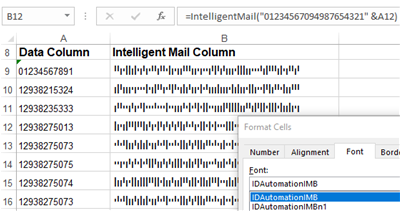
IntelligentMail() function uses the IDAutomationIMB font to generate the
Intelligent Mail Barcode (IMb). This barcode type combines PostNet ZIP code data and Planet tracking into one compact symbol. It is also referred to as the
IMb Tracing Barcode, the 4-State Customer Barcode (4CB), OneCode Confirm, and
OneCode ACS.
-
The
Code128() function uses the IDAutomationC128L font for the IM Container
Barcode, Intelligent Mail Package Barcode (IMpb),
IM Tray Labels, and special
services such as delivery confirmation.
-
The
Postnet() function uses the IDAutomationPOSTNET font to encode the ZIP code
and delivery point. The USPS uses Postnet barcodes to automate the delivery of mail; however, discounts for bulk mail printed with the Postnet barcode are no longer available.
Formatting Data to Fonts
After the data is in the proper format for the function, the text is passed to the function, and the result is a text string to which the font is then applied to produce a proper barcode symbol. The functions are available in many font encoders
to automatically format data to the font. When a font encoder cannot be utilized, it is recommended to access a database that contains the text string already formatted for the font. The Word mail-merge example included in this package works in this manner: a merge field in Word is linked to a column in Excel that contains the text string formatted for the font.
Postal Barcode Printing and Font Size
After the data is formatted to the USPS font and the appropriate font has been selected, it will display and print properly. The font size of 12 points should be used when printing all IMb, Postnet, and Planet barcodes.
FIM symbols should be printed with a font size of 36 points. The Code 128 font used for GS1-128 should be printed at 16 points for USPS Special Services. More
information about the sizing of fonts is provided in the
Font Specifications chart below.
USPS Barcode Font Package Specifications
IDAutomation suggests printing USPS fonts at the recommended point sizes specified in this section. When TrueType, PostScript, or OpenType fonts are used,
the size may be further adjusted by changing the font point size. For example,
to print the 12-point Postnet barcode font slightly wider, increase the font size to 12.1 points.
IMb, Postnet & Planet Font Specifications
|
Parameter |
Approximate Font Dimensions at 12 Points |
USPS Specification Tolerances |
| X Dimension (width of bars) |
.017" |
.015" - .025" |
| Width of space between bars |
.026" |
.012" - .040" |
| Full vertical size of Intelligent Mail |
.135" |
.125" - .165" |
| Vertical size of the Intelligent Mail tracker |
.041" |
.039" - .057" |
| Height of the Postnet short bar |
.051" |
.040" - .060" |
| Height of Postnet tall bar |
.126" |
.115" - .135" |
| Number of bars per inch |
23 |
22 - 24 |
IDAutomationOCRa Specifications
|
Font Name |
Point Size |
CPI |
ANSI Size |
| IDAutomationOCRa |
9 |
10 |
1 |
IDAutomationC128L Specifications
|
Parameter |
Approximate Font Dimensions at 16 pt |
USPS Dimension Standards |
| X Dimension |
.0135" |
.013" - .020" |
| Height of bars |
.75" |
.75" - .80" |
|
Parameter |
Approximate Font Dimensions at 21
pt |
| X Dimension |
.017" |
| Height of bars |
1" |
Supported Implementations, Font Names, and Compatible
Functions
|
Implementation |
Font Name |
Font Encoder Function |
| IMB Barcode |
IDAutomationIMB
IDAutomationIMBn1 *
IDAutomationIMBn2 |
IntelligentMail(), OneCode()
or IDAutomation_Uni_OneCode() ** |
| Postnet Barcode |
IDAutomationPOSTNET
IDAutomationPOSTNETn1 *
IDAutomationPOSTNETn2 |
Postnet() |
| Planet Barcode |
IDAutomationPLANET
IDAutomationPLANETn1 *
IDAutomationPLANETn2 |
Postnet() |
| OCR-A Text |
IDAutomationOCRa |
na |
| Code 128 Barcode |
IDAutomationC128L |
Code128() |
| FIM Barcode |
IDAutomationFIM |
na |
* Fonts ending with N1 or N2 signify different narrow intensities:
- n1 is a narrow-version font that generates the smallest possible
barcode allowed by the specification, which is 24 bars per inch and a narrow bar
width of .015 inches.
- n2 is an extra narrow-version font that also produces 24 bars per inch, but
with the bars narrowed by an additional 10%. This font may be used with inkjet
printers or others that print much darker than normal.
** Intelligent Mail IMb barcode fonts are currently supported with OneCode() and IntelligentMail() encoding methods, which are identical and may be
used interchangeably.
Intelligent Mail (IMb) barcodes may be created from IDAutomation's fonts and font
encoder tools, as well as other encoders, such as the encoders provided by the
US Postal Service. To accommodate both types of encoding, each 4-State symbol
element is positioned at two character locations within the IDAutomationIMB font according
to the following table:
|
4CB Symbol Element |
Character Locations |
| Ascender |
A, q |
| Descender |
D, r |
| Full Bar |
F, p |
| Tracker |
T, s |
The USPS IMb specification uses uppercase letters for encoding, while IDAutomation font encoders
use lowercase letters. The lowercase letters are used to provide complete
compatibility with the
IDAutomation
Universal Barcode Font, which allows the generation of IMb, as well as Code 128, Code 39, and Interleaved 2 of 5 barcode symbols
from a single font.
* Due to limitations within Crystal Reports formulas, complex barcode types, including USPS Intelligent Mail, require the installation of the IDAutomation UFL (version 2014 or later) to perform a portion of the complex calculations required for proper barcode generation. Installation of this UFL is automatic when running the installer for this product. In addition, a silent installer is provided with all developer licenses of this product to easily install the UFL when distributing reports. A separate installer is provided for systems that do not have .NET 2x-3x installed; this is provided in the ".NET Framework 4.5 UFL Installer" folder of the downloaded zip file.






The Install was Easy
I am using the fonts to recreate the IMB Barcode through Microsoft Word. It is a very archaic way of producing variable data pieces but the font was needed for Postal Services regulation. The install was easy and I did not need technical support through the install process.
Works without hassle!
So, you need to print an IMb. You have a number of options. Some are free, some are expensive, and most are a pain to use. This package of fonts, support, and all the work of creating the tools to use them, sits at the upper end of the least-expensive solutions. The supplied tools Just Plain Work. No hassle. Though I did not run into any problems, knowing that I have someone to call should it happen is worth the cost of admission.
Ready to Print!
You are the man! Thanks a lot for your help over the phone getting this up and running. We are ready to print!
Installed just like any other font, easily.
We chose this product because of clearly presented product descriptions and availability of macros to help with check digits etc. We can now use the barcode fonts in our packaging designs instead of creating a graphic and placing it in the documents manually. It's much faster and more reliable.